> ## Documentation Index
> Fetch the complete documentation index at: https://docs2.openclaw.ai/llms.txt
> Use this file to discover all available pages before exploring further.
# Feishu
OpenClaw 通过官方 `@openclaw/feishu` 插件连接到 Feishu/Lark(一体化协作平台):Bot 私信、群聊、流式卡片回复,以及 Feishu 文档/wiki/drive/Bitable 工具。
**状态:** Bot 私信 + 群聊已可用于生产。WebSocket 是默认事件传输方式(无需公共 URL);webhook 模式为可选。
## 快速开始
需要 OpenClaw 2026.5.29 或更高版本。运行 `openclaw --version` 检查。使用 `openclaw update` 升级。
```bash theme={"theme":{"light":"min-light","dark":"min-dark"}}
openclaw channels login --channel feishu
```
如果缺少 `@openclaw/feishu` 插件,这会先安装它,然后引导完成设置:
* **手动设置**:从 Feishu Open Platform(`https://open.feishu.cn`)或 Lark Developer(`https://open.larksuite.com`)粘贴 App ID 和 App Secret。
* **二维码设置**:在 Feishu 应用中扫描二维码以自动创建 Bot。此流程会将私信锁定到你自己的账号(`dmPolicy: "allowlist"`,并包含你的 `open_id`)。
该向导还会询问 API 域名(Feishu 与 Lark)和群组策略。如果国内版 Feishu 移动应用对二维码没有反应,请重新运行设置并选择手动设置。
```bash theme={"theme":{"light":"min-light","dark":"min-dark"}}
openclaw gateway restart
```
## 访问控制
### 直接消息
配置 `channels.feishu.dmPolicy`(默认值:`pairing`)来控制谁可以向 Bot 发送私信:
| 值 | 行为 |
| ------------- | ----------------------------------------------- |
| `"pairing"` | 未知用户会收到配对码;通过 CLI 批准 |
| `"allowlist"` | 只有列在 `allowFrom` 中的用户可以聊天 |
| `"open"` | 公开私信;配置校验要求 `allowFrom` 包含 `"*"`。非通配符条目仍会缩小访问范围 |
**批准配对请求:**
```bash theme={"theme":{"light":"min-light","dark":"min-dark"}}
openclaw pairing list feishu
openclaw pairing approve feishu
```
### 群聊
**群组策略**(`channels.feishu.groupPolicy`,默认值:`allowlist`):
| 值 | 行为 |
| ------------- | -------------------------------------------------------- |
| `"open"` | 回复群组中的所有消息 |
| `"allowlist"` | 只回复 `groupAllowFrom` 中的群组,或在 `groups.` 下显式配置的群组 |
| `"disabled"` | 禁用所有群组消息;显式的 `groups.` 条目不会覆盖此设置 |
**提及要求**(`channels.feishu.requireMention`):
* 默认:需要 @提及,但当有效群组策略为 `"open"` 时例外;此时默认值为 `false`,因此无法携带提及的消息(例如图片)仍可到达智能体。
* 显式设置为 `true` 或 `false` 可覆盖;按群组覆盖:`channels.feishu.groups..requireMention`。
* 仅广播的 `@all` 和 `@_all` 不会被视为 Bot 提及。同时提及 `@all` 和直接提及 Bot 的消息仍会算作 Bot 提及。
## 群组配置示例
### 允许所有群组,不要求 @提及
```json5 theme={"theme":{"light":"min-light","dark":"min-dark"}}
{
channels: {
feishu: {
groupPolicy: "open", // requireMention defaults to false under "open"
},
},
}
```
### 允许所有群组,仍要求 @提及
```json5 theme={"theme":{"light":"min-light","dark":"min-dark"}}
{
channels: {
feishu: {
groupPolicy: "open",
requireMention: true,
},
},
}
```
### 仅允许特定群组
```json5 theme={"theme":{"light":"min-light","dark":"min-dark"}}
{
channels: {
feishu: {
groupPolicy: "allowlist",
// Group IDs look like: oc_xxx
groupAllowFrom: ["oc_xxx", "oc_yyy"],
},
},
}
```
在 `allowlist` 模式下,你也可以通过添加显式的 `groups.` 条目来准入某个群组。显式条目不会覆盖 `groupPolicy: "disabled"`。`groups.*` 下的通配符默认值会配置匹配群组,但它们本身不会准入群组。
```json5 theme={"theme":{"light":"min-light","dark":"min-dark"}}
{
channels: {
feishu: {
groupPolicy: "allowlist",
groups: {
oc_xxx: {
requireMention: false,
},
},
},
},
}
```
### 限制群组内发送者
```json5 theme={"theme":{"light":"min-light","dark":"min-dark"}}
{
channels: {
feishu: {
groupPolicy: "allowlist",
groupAllowFrom: ["oc_xxx"],
groups: {
oc_xxx: {
// User open_ids look like: ou_xxx
allowFrom: ["ou_user1", "ou_user2"],
},
},
},
},
}
```
`channels.feishu.groupSenderAllowFrom` 会为所有群组设置相同的发送者允许列表;按群组的 `allowFrom` 优先级更高。
## 获取群组/用户 ID
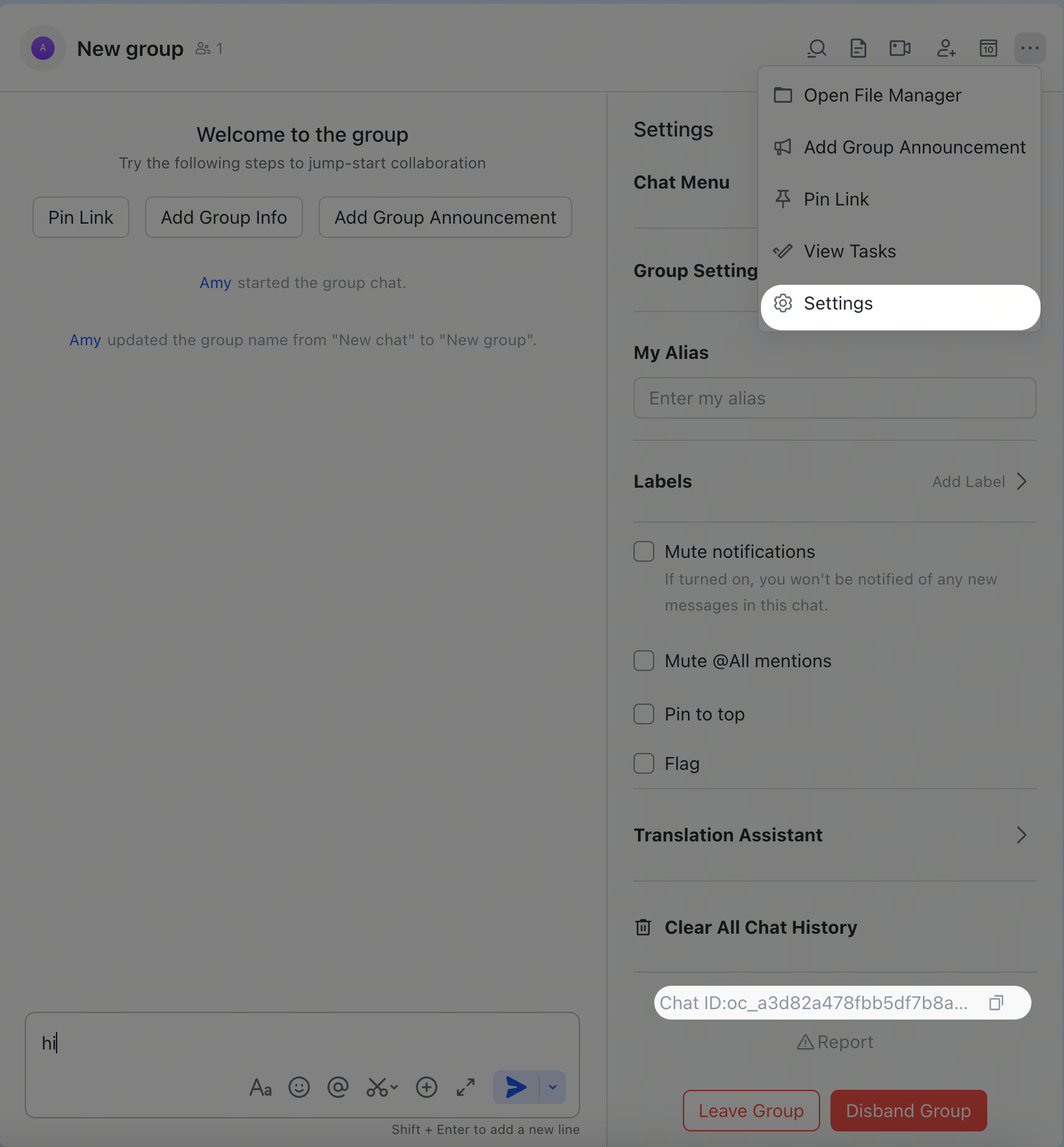
### 群组 ID(`chat_id`,格式:`oc_xxx`)
在 Feishu/Lark 中打开群组,点击右上角菜单图标,然后进入**设置**。群组 ID(`chat_id`)会列在设置页面中。
 ### 用户 ID(`open_id`,格式:`ou_xxx`)
启动 Gateway 网关,向 Bot 发送私信,然后检查日志:
```bash theme={"theme":{"light":"min-light","dark":"min-dark"}}
openclaw logs --follow
```
在日志输出中查找 `open_id`。你也可以检查待处理的配对请求:
```bash theme={"theme":{"light":"min-light","dark":"min-dark"}}
openclaw pairing list feishu
```
## 常用命令
| 命令 | 描述 |
| --------- | ----------- |
| `/status` | 显示 Bot 状态 |
| `/reset` | 重置当前会话 |
| `/model` | 显示或切换 AI 模型 |
Feishu/Lark 不支持原生斜杠菜单,因此请将这些命令作为纯文本消息发送。
## 故障排查
### Bot 在群聊中没有响应
1. 确保 Bot 已添加到群组
2. 确保你 @提及了 Bot(默认要求)
3. 验证 `groupPolicy` 不是 `"disabled"`
4. 检查日志:`openclaw logs --follow`
### Bot 没有收到消息
1. 确保 Bot 已在 Feishu Open Platform / Lark Developer 中发布并通过审核
2. 确保事件订阅包含 `im.message.receive_v1`
3. 确保已选择**长连接**(WebSocket)
4. 确保已授予所有必需的权限范围
5. 确保 Gateway 网关正在运行:`openclaw gateway status`
6. 检查日志:`openclaw logs --follow`
### 二维码设置在 Feishu 移动应用中没有反应
1. 重新运行设置:`openclaw channels login --channel feishu`
2. 选择手动设置
3. 在 Feishu Open Platform 中创建自建应用,并复制其 App ID 和 App Secret
4. 将这些凭证粘贴到设置向导中
### App Secret 泄露
1. 在 Feishu Open Platform / Lark Developer 中重置 App Secret
2. 更新你的配置中的值
3. 重启 Gateway 网关:`openclaw gateway restart`
## 高级配置
### 多账号
```json5 theme={"theme":{"light":"min-light","dark":"min-dark"}}
{
channels: {
feishu: {
defaultAccount: "main",
accounts: {
main: {
appId: "cli_xxx",
appSecret: "xxx",
name: "Primary bot",
tts: {
providers: {
openai: { voice: "shimmer" },
},
},
},
backup: {
appId: "cli_yyy",
appSecret: "yyy",
name: "Backup bot",
enabled: false,
},
},
},
},
}
```
`defaultAccount` 控制当出站 API 未指定 `accountId` 时使用哪个账号。账号条目会继承顶层设置;大多数顶层键都可以按账号覆盖。
`accounts..tts` 使用与 `messages.tts` 相同的结构,并深度合并到全局 TTS 配置之上,因此多 Bot Feishu 设置可以在全局保留共享提供商凭证,同时仅按账号覆盖语音、模型、人设或自动模式。
### 消息限制
* `textChunkLimit` - 出站文本分块大小(默认值:`4000` 个字符)
* `chunkMode` - `"length"`(默认值)按限制拆分;`"newline"` 优先使用换行边界
* `mediaMaxMb` - 媒体上传/下载限制(默认值:`30` MB)
### 流式传输
Feishu/Lark 支持通过交互式卡片(Card Kit streaming API)进行流式回复。启用后,Bot 会在生成文本时实时更新卡片。
```json5 theme={"theme":{"light":"min-light","dark":"min-dark"}}
{
channels: {
feishu: {
streaming: true, // enable streaming card output (default: true)
blockStreaming: true, // opt into completed-block streaming
},
},
}
```
设置 `streaming: false` 可在一条消息中发送完整回复;`renderMode: "raw"`(使用纯文本而非卡片)也会禁用流式卡片。`blockStreaming` 默认关闭;仅当你希望在最终回复前刷新已完成的助手块时才启用它。
### 配额优化
使用两个可选标志减少 Feishu/Lark API 调用次数:
* `typingIndicator`(默认值 `true`):设置为 `false` 可跳过输入状态反应调用
* `resolveSenderNames`(默认值 `true`):设置为 `false` 可跳过发送者资料查询
```json5 theme={"theme":{"light":"min-light","dark":"min-dark"}}
{
channels: {
feishu: {
typingIndicator: false,
resolveSenderNames: false,
},
},
}
```
### 群组会话范围和话题线程
`channels.feishu.groupSessionScope`(顶层、按账号或按群组)控制群组消息如何映射到智能体会话:
| 值 | 会话 |
| ---------------------- | ------------------------------ |
| `"group"`(默认值) | 每个群聊一个会话 |
| `"group_sender"` | 每个(群组 + 发送者)一个会话 |
| `"group_topic"` | 每个话题线程一个会话;回退到群组会话 |
| `"group_topic_sender"` | 每个(话题 + 发送者)一个会话;回退到(群组 + 发送者) |
对于话题范围,原生 Feishu/Lark 话题群会使用事件 `thread_id`(`omt_*`)作为规范话题会话键。如果原生话题发起事件省略了 `thread_id`,OpenClaw 会先从 Feishu 补全它,再路由该轮次。OpenClaw 转换成线程的普通群组回复会继续使用回复根消息 ID(`om_*`),因此第一轮和后续轮次会保留在同一会话中。
设置 `replyInThread: "enabled"`(顶层或按群组)可让 Bot 回复创建或继续一个 Feishu 话题线程,而不是行内回复。`topicSessionMode` 是 `groupSessionScope` 已弃用的前身;请优先使用 `groupSessionScope`。
### Feishu 工作区工具
该插件附带用于 Feishu 文档、聊天、知识库、云存储、权限和 Bitable 的智能体工具,以及配套 Skills(`feishu-doc`、`feishu-drive`、`feishu-perm`、`feishu-wiki`)。工具族由 `channels.feishu.tools` 控制:
| 键 | 工具 | 默认值 |
| --------------- | ---------------------------------- | ----------- |
| `tools.doc` | `feishu_doc` 文档操作 | `true` |
| `tools.chat` | `feishu_chat` 聊天信息 + 成员查询 | `true` |
| `tools.wiki` | `feishu_wiki` 知识库(需要 `doc`) | `true` |
| `tools.drive` | `feishu_drive` 云存储 | `true` |
| `tools.perm` | `feishu_perm` 权限管理 | `false`(敏感) |
| `tools.scopes` | `feishu_app_scopes` 应用权限范围诊断 | `true` |
| `tools.bitable` | `feishu_bitable_*` Bitable/Base 操作 | `true` |
`tools.base` 是 `tools.bitable` 的别名;当两者都设置时,显式的 `bitable` 值优先。按账号的开关位于 `accounts..tools` 下。
### ACP 会话
Feishu/Lark 支持针对私信和群组线程消息的 ACP。Feishu/Lark ACP 由文本命令驱动,没有原生斜杠菜单,因此请直接在对话中使用 `/acp ...` 消息。
#### 持久 ACP 绑定
```json5 theme={"theme":{"light":"min-light","dark":"min-dark"}}
{
agents: {
list: [
{
id: "codex",
runtime: {
type: "acp",
acp: {
agent: "codex",
backend: "acpx",
mode: "persistent",
cwd: "/workspace/openclaw",
},
},
},
],
},
bindings: [
{
type: "acp",
agentId: "codex",
match: {
channel: "feishu",
accountId: "default",
peer: { kind: "direct", id: "ou_1234567890" },
},
},
{
type: "acp",
agentId: "codex",
match: {
channel: "feishu",
accountId: "default",
peer: { kind: "group", id: "oc_group_chat:topic:om_topic_root" },
},
acp: { label: "codex-feishu-topic" },
},
],
}
```
#### 从聊天中启动 ACP
在 Feishu/Lark 私信或线程中:
```text theme={"theme":{"light":"min-light","dark":"min-dark"}}
/acp spawn codex --thread here
```
`--thread here` 适用于私信和 Feishu/Lark 线程消息。绑定会话中的后续消息会直接路由到该 ACP 会话。
### 多智能体路由
使用 `bindings` 将 Feishu/Lark 私信或群组路由到不同的智能体。
```json5 theme={"theme":{"light":"min-light","dark":"min-dark"}}
{
agents: {
list: [
{ id: "main" },
{ id: "agent-a", workspace: "/home/user/agent-a" },
{ id: "agent-b", workspace: "/home/user/agent-b" },
],
},
bindings: [
{
agentId: "agent-a",
match: {
channel: "feishu",
peer: { kind: "direct", id: "ou_xxx" },
},
},
{
agentId: "agent-b",
match: {
channel: "feishu",
peer: { kind: "group", id: "oc_zzz" },
},
},
],
}
```
路由字段:
* `match.channel`: `"feishu"`
* `match.peer.kind`: `"direct"`(私信)或 `"group"`(群聊)
* `match.peer.id`: 用户 Open ID(`ou_xxx`)或群组 ID(`oc_xxx`)
查看[获取群组/用户 ID](#get-groupuser-ids)了解查询提示。
## 每用户 Agent 隔离(动态 Agent 创建)
启用 `dynamicAgentCreation`,为每个私信用户自动创建**隔离的智能体实例**。每个用户都会获得自己的:
* 独立工作区目录
* 单独的 `USER.md` / `SOUL.md` / `MEMORY.md`
* 私有会话历史
* 隔离的 Skills 和状态
这对公共 Bot 很重要,因为你希望每个用户都有自己的私有 AI 助手体验。
动态绑定包含规范化后的 Feishu `accountId`,因此默认账户和命名账户会将每个发送者路由到正确的动态智能体。
如果某个命名账户在较旧版本中创建了未限定作用域的动态智能体,该旧版智能体仍会计入 `maxAgents`。移除它之前,请确认默认账户没有使用它,或临时提高 `maxAgents`;OpenClaw 无法安全推断模糊旧版状态归属于哪个账户。
### 快速设置
```json5 theme={"theme":{"light":"min-light","dark":"min-dark"}}
{
channels: {
feishu: {
dmPolicy: "open",
allowFrom: ["*"],
dynamicAgentCreation: {
enabled: true,
workspaceTemplate: "~/.openclaw/workspace-{agentId}",
agentDirTemplate: "~/.openclaw/agents/{agentId}/agent",
},
},
},
session: {
// Critical: makes each user's DM their "main session"
// Automatically loads USER.md / SOUL.md / MEMORY.md
// For stronger isolation, use "per-channel-peer" instead
dmScope: "main",
},
}
```
### 工作原理
当新用户发送第一条私信时:
1. 渠道生成唯一的 `agentId`:默认账户使用 `feishu-{user_open_id}`,命名账户使用带有有界账户前缀的身份摘要
2. 在 `workspaceTemplate` 路径创建新工作区
3. 注册智能体,并为该用户创建绑定
4. 工作区助手在首次访问时确保引导文件(`AGENTS.md`、`SOUL.md`、`USER.md` 等)存在
5. 将该用户未来的所有消息路由到其专用智能体
### 配置选项
| 设置 | 描述 | 默认值 |
| -------------------------------------------------------- | ------------- | ------------------------------------ |
| `channels.feishu.dynamicAgentCreation.enabled` | 启用自动每用户智能体创建 | `false` |
| `channels.feishu.dynamicAgentCreation.workspaceTemplate` | 动态智能体工作区的路径模板 | `~/.openclaw/workspace-{agentId}` |
| `channels.feishu.dynamicAgentCreation.agentDirTemplate` | Agent 目录名称模板 | `~/.openclaw/agents/{agentId}/agent` |
| `channels.feishu.dynamicAgentCreation.maxAgents` | 可创建的动态智能体最大数量 | 无限制 |
模板变量:
* `{agentId}` - 生成的 Agent ID(例如 `feishu-ou_xxxxxx` 或 `feishu-support-`)
* `{userId}` - 发送者的 Feishu open\_id(例如 `ou_xxxxxx`)
### 会话作用域
`session.dmScope` 控制如何将私信映射到智能体会话。这是影响所有渠道的**全局设置**。
| 值 | 行为 | 最适合场景 |
| ---------------------------- | ------------------------ | -------------------------------------- |
| `"main"` | 每个用户的私信映射到其智能体的主会话 | 你希望自动加载 `USER.md` / `SOUL.md` 的单用户 Bot |
| `"per-peer"` | 每个对端获得独立会话(不区分渠道) | 仅按发送者身份进行隔离 |
| `"per-channel-peer"` | 每个(渠道 + 用户)组合获得独立会话 | 需要更强隔离的公共多用户 Bot |
| `"per-account-channel-peer"` | 每个(账户 + 渠道 + 用户)组合获得独立会话 | 需要账户级会话隔离的多账户 Bot |
**权衡**:使用 `"main"` 会启用引导文件(`USER.md`、`SOUL.md`、`MEMORY.md`)自动加载,但意味着所有渠道中的所有私信共享同一种会话键模式。对于更重视隔离而非引导自动加载的公共多用户 Bot,请考虑 `"per-channel-peer"`,并手动管理引导文件。
当命名 Feishu 账户应为同一发送者保留独立会话时,请使用 `"per-account-channel-peer"`。动态绑定会保留账户作用域。
### 典型多用户部署
```json5 theme={"theme":{"light":"min-light","dark":"min-dark"}}
{
channels: {
feishu: {
appId: "cli_xxx",
appSecret: "xxx",
dmPolicy: "open",
allowFrom: ["*"],
groupPolicy: "open",
requireMention: true,
dynamicAgentCreation: {
enabled: true,
workspaceTemplate: "~/.openclaw/workspace-{agentId}",
agentDirTemplate: "~/.openclaw/agents/{agentId}/agent",
},
},
},
session: {
// Choose dmScope based on your isolation needs:
// "main" for bootstrap auto-loading, "per-channel-peer" for stronger isolation
dmScope: "main",
},
bindings: [], // Empty - dynamic agents auto-bind
}
```
### 验证
检查 Gateway 网关日志,确认动态创建正在工作:
```text theme={"theme":{"light":"min-light","dark":"min-dark"}}
feishu: creating dynamic agent "feishu-ou_xxxxxx" for user ou_xxxxxx
workspace: /home/user/.openclaw/workspace-feishu-ou_xxxxxx
agentDir: /home/user/.openclaw/agents/feishu-ou_xxxxxx/agent
```
列出所有已创建的工作区:
```bash theme={"theme":{"light":"min-light","dark":"min-dark"}}
ls -la ~/.openclaw/workspace-*
```
### 说明
* **工作区隔离**:每个用户都有自己的工作区目录和智能体实例。在正常消息流中,用户无法看到彼此的会话历史或文件。
* **安全边界**:这是消息上下文隔离机制,不是针对恶意共租户的安全边界。智能体进程和主机环境是共享的。
* **配置写入必须保持启用**:动态智能体创建会将智能体和绑定写入配置;当 `channels.feishu.configWrites` 为 `false` 时会跳过(默认:启用)。
* **`bindings` 应为空**:动态智能体会自动注册自己的绑定
* **升级路径**:现有手动绑定会继续与动态智能体并行工作
* **`session.dmScope` 是全局的**:这会影响所有渠道,不只是 Feishu
## 配置参考
完整配置:[Gateway 配置](/zh-CN/gateway/configuration)
| 设置 | 描述 | 默认值 |
| -------------------------------------------------------- | ----------------------------------------------------------------- | ------------------------------------ |
| `channels.feishu.enabled` | 启用/禁用该渠道 | `true` |
| `channels.feishu.domain` | API 域名(`feishu`、`lark` 或 `https://` 基础 URL) | `feishu` |
| `channels.feishu.connectionMode` | 事件传输(`websocket` 或 `webhook`) | `websocket` |
| `channels.feishu.defaultAccount` | 出站路由的默认账号 | `default` |
| `channels.feishu.verificationToken` | webhook 模式必需 | - |
| `channels.feishu.encryptKey` | webhook 模式必需 | - |
| `channels.feishu.webhookPath` | Webhook 路由路径 | `/feishu/events` |
| `channels.feishu.webhookHost` | Webhook 绑定主机 | `127.0.0.1` |
| `channels.feishu.webhookPort` | Webhook 绑定端口 | `3000` |
| `channels.feishu.accounts..appId` | 应用 ID | - |
| `channels.feishu.accounts..appSecret` | 应用密钥 | - |
| `channels.feishu.accounts..domain` | 每账号域名覆盖 | `feishu` |
| `channels.feishu.accounts..tts` | 每账号 TTS 覆盖 | `messages.tts` |
| `channels.feishu.dmPolicy` | 私信策略(`pairing`、`allowlist`、`open`) | `pairing` |
| `channels.feishu.allowFrom` | 私信允许列表(open\_id 列表) | - |
| `channels.feishu.groupPolicy` | 群组策略(`open`、`allowlist`、`disabled`) | `allowlist` |
| `channels.feishu.groupAllowFrom` | 群组允许列表 | - |
| `channels.feishu.groupSenderAllowFrom` | 应用于所有群组的发送者允许列表 | - |
| `channels.feishu.requireMention` | 群组中要求 @提及 | `true`(策略为 `open` 时为 `false`) |
| `channels.feishu.groups..requireMention` | 每群组 @提及覆盖;显式 ID 也会在允许列表模式中准入该群组 | 继承 |
| `channels.feishu.groups..enabled` | 启用/禁用特定群组 | `true` |
| `channels.feishu.groups..allowFrom` | 每群组发送者允许列表(覆盖 `groupSenderAllowFrom`) | - |
| `channels.feishu.groupSessionScope` | 群组会话映射(`group`、`group_sender`、`group_topic`、`group_topic_sender`) | `group` |
| `channels.feishu.replyInThread` | Bot 回复会创建/继续话题线程(`disabled`、`enabled`) | `disabled` |
| `channels.feishu.reactionNotifications` | 入站表情回应事件(`off`、`own`、`all`) | `own` |
| `channels.feishu.dynamicAgentCreation.enabled` | 启用自动按用户创建智能体 | `false` |
| `channels.feishu.dynamicAgentCreation.workspaceTemplate` | 动态 Agent 工作区的路径模板 | `~/.openclaw/workspace-{agentId}` |
| `channels.feishu.dynamicAgentCreation.agentDirTemplate` | Agent 目录名称模板 | `~/.openclaw/agents/{agentId}/agent` |
| `channels.feishu.dynamicAgentCreation.maxAgents` | 要创建的动态智能体最大数量 | 无限制 |
| `channels.feishu.textChunkLimit` | 消息分块大小 | `4000` |
| `channels.feishu.chunkMode` | 分块拆分方式(`length` 或 `newline`) | `length` |
| `channels.feishu.mediaMaxMb` | 媒体大小限制 | `30` |
| `channels.feishu.renderMode` | 回复渲染(`auto`、`raw`、`card`) | `auto` |
| `channels.feishu.streaming` | 流式卡片输出 | `true` |
| `channels.feishu.blockStreaming` | 已完成块回复流式传输 | `false` |
| `channels.feishu.typingIndicator` | 发送输入中表情回应 | `true` |
| `channels.feishu.resolveSenderNames` | 解析发送者显示名称 | `true` |
| `channels.feishu.configWrites` | 允许渠道发起配置写入(动态智能体需要) | `true` |
| `channels.feishu.tools.doc` | 启用文档工具 | `true` |
| `channels.feishu.tools.chat` | 启用聊天信息工具 | `true` |
| `channels.feishu.tools.wiki` | 启用知识库工具(需要 `doc`) | `true` |
| `channels.feishu.tools.drive` | 启用云存储工具 | `true` |
| `channels.feishu.tools.perm` | 启用权限管理工具 | `false` |
| `channels.feishu.tools.scopes` | 启用应用权限范围诊断工具 | `true` |
| `channels.feishu.tools.bitable` | 启用 Bitable/Base 工具 | `true` |
| `channels.feishu.tools.base` | `channels.feishu.tools.bitable` 的别名;两者都设置时,显式 `bitable` 优先 | `true` |
| `channels.feishu.accounts..tools.bitable` | 每账号 Bitable/Base 工具门控 | 继承 |
| `channels.feishu.accounts..tools.base` | 每账号 `tools.bitable` 别名 | 继承 |
## 支持的消息类型
### 接收
* ✅ 文本
* ✅ 富文本(post)
* ✅ 图片
* ✅ 文件
* ✅ 音频
* ✅ 视频/媒体
* ✅ 贴纸
入站 Feishu/Lark 音频消息会规范化为媒体占位符,而不是原始 `file_key` JSON。当配置了 `tools.media.audio` 时,OpenClaw 会下载语音备注资源,并在智能体轮次前运行共享音频转写,因此智能体会收到语音转写文本。如果 Feishu 在音频载荷中直接包含转写文本,则会直接使用该文本,而不再发起另一次 ASR 调用。没有音频转写提供商时,智能体仍会收到 `` 占位符以及已保存的附件,而不是原始 Feishu 资源载荷。
### 发送
* ✅ 文本
* ✅ 图片
* ✅ 文件
* ✅ 音频
* ✅ 视频/媒体
* ✅ 交互式卡片(包括流式更新)
* ⚠️ 富文本(post 风格格式;不支持完整 Feishu/Lark 编写能力)
原生 Feishu/Lark 音频气泡使用 Feishu `audio` 消息类型,并要求上传 Ogg/Opus 媒体(`file_type: "opus"`)。现有 `.opus` 和 `.ogg` 媒体会直接作为原生音频发送。只有当回复请求语音投递(`audioAsVoice` / 消息工具 `asVoice`,包括 TTS 语音备注回复)时,MP3/WAV/M4A 和其他可能的音频格式才会使用 `ffmpeg` 转码为 48kHz Ogg/Opus。普通 MP3 附件仍作为常规文件。如果缺少 `ffmpeg` 或转换失败,OpenClaw 会回退为文件附件并记录原因。
### 线程和回复
* ✅ 行内回复
* ✅ 线程回复
* ✅ 回复线程消息时,媒体回复仍保持线程感知
话题群组会话路由见
[群组会话范围和话题线程](#group-session-scope-and-topic-threads)。
## 相关
* [渠道概览](/zh-CN/channels) - 所有支持的渠道
* [配对](/zh-CN/channels/pairing) - 私信认证和配对流程
* [群组](/zh-CN/channels/groups) - 群聊行为和提及门控
* [频道路由](/zh-CN/channels/channel-routing) - 消息的会话路由
* [安全](/zh-CN/gateway/security) - 访问模型和加固
### 用户 ID(`open_id`,格式:`ou_xxx`)
启动 Gateway 网关,向 Bot 发送私信,然后检查日志:
```bash theme={"theme":{"light":"min-light","dark":"min-dark"}}
openclaw logs --follow
```
在日志输出中查找 `open_id`。你也可以检查待处理的配对请求:
```bash theme={"theme":{"light":"min-light","dark":"min-dark"}}
openclaw pairing list feishu
```
## 常用命令
| 命令 | 描述 |
| --------- | ----------- |
| `/status` | 显示 Bot 状态 |
| `/reset` | 重置当前会话 |
| `/model` | 显示或切换 AI 模型 |
Feishu/Lark 不支持原生斜杠菜单,因此请将这些命令作为纯文本消息发送。
## 故障排查
### Bot 在群聊中没有响应
1. 确保 Bot 已添加到群组
2. 确保你 @提及了 Bot(默认要求)
3. 验证 `groupPolicy` 不是 `"disabled"`
4. 检查日志:`openclaw logs --follow`
### Bot 没有收到消息
1. 确保 Bot 已在 Feishu Open Platform / Lark Developer 中发布并通过审核
2. 确保事件订阅包含 `im.message.receive_v1`
3. 确保已选择**长连接**(WebSocket)
4. 确保已授予所有必需的权限范围
5. 确保 Gateway 网关正在运行:`openclaw gateway status`
6. 检查日志:`openclaw logs --follow`
### 二维码设置在 Feishu 移动应用中没有反应
1. 重新运行设置:`openclaw channels login --channel feishu`
2. 选择手动设置
3. 在 Feishu Open Platform 中创建自建应用,并复制其 App ID 和 App Secret
4. 将这些凭证粘贴到设置向导中
### App Secret 泄露
1. 在 Feishu Open Platform / Lark Developer 中重置 App Secret
2. 更新你的配置中的值
3. 重启 Gateway 网关:`openclaw gateway restart`
## 高级配置
### 多账号
```json5 theme={"theme":{"light":"min-light","dark":"min-dark"}}
{
channels: {
feishu: {
defaultAccount: "main",
accounts: {
main: {
appId: "cli_xxx",
appSecret: "xxx",
name: "Primary bot",
tts: {
providers: {
openai: { voice: "shimmer" },
},
},
},
backup: {
appId: "cli_yyy",
appSecret: "yyy",
name: "Backup bot",
enabled: false,
},
},
},
},
}
```
`defaultAccount` 控制当出站 API 未指定 `accountId` 时使用哪个账号。账号条目会继承顶层设置;大多数顶层键都可以按账号覆盖。
`accounts..tts` 使用与 `messages.tts` 相同的结构,并深度合并到全局 TTS 配置之上,因此多 Bot Feishu 设置可以在全局保留共享提供商凭证,同时仅按账号覆盖语音、模型、人设或自动模式。
### 消息限制
* `textChunkLimit` - 出站文本分块大小(默认值:`4000` 个字符)
* `chunkMode` - `"length"`(默认值)按限制拆分;`"newline"` 优先使用换行边界
* `mediaMaxMb` - 媒体上传/下载限制(默认值:`30` MB)
### 流式传输
Feishu/Lark 支持通过交互式卡片(Card Kit streaming API)进行流式回复。启用后,Bot 会在生成文本时实时更新卡片。
```json5 theme={"theme":{"light":"min-light","dark":"min-dark"}}
{
channels: {
feishu: {
streaming: true, // enable streaming card output (default: true)
blockStreaming: true, // opt into completed-block streaming
},
},
}
```
设置 `streaming: false` 可在一条消息中发送完整回复;`renderMode: "raw"`(使用纯文本而非卡片)也会禁用流式卡片。`blockStreaming` 默认关闭;仅当你希望在最终回复前刷新已完成的助手块时才启用它。
### 配额优化
使用两个可选标志减少 Feishu/Lark API 调用次数:
* `typingIndicator`(默认值 `true`):设置为 `false` 可跳过输入状态反应调用
* `resolveSenderNames`(默认值 `true`):设置为 `false` 可跳过发送者资料查询
```json5 theme={"theme":{"light":"min-light","dark":"min-dark"}}
{
channels: {
feishu: {
typingIndicator: false,
resolveSenderNames: false,
},
},
}
```
### 群组会话范围和话题线程
`channels.feishu.groupSessionScope`(顶层、按账号或按群组)控制群组消息如何映射到智能体会话:
| 值 | 会话 |
| ---------------------- | ------------------------------ |
| `"group"`(默认值) | 每个群聊一个会话 |
| `"group_sender"` | 每个(群组 + 发送者)一个会话 |
| `"group_topic"` | 每个话题线程一个会话;回退到群组会话 |
| `"group_topic_sender"` | 每个(话题 + 发送者)一个会话;回退到(群组 + 发送者) |
对于话题范围,原生 Feishu/Lark 话题群会使用事件 `thread_id`(`omt_*`)作为规范话题会话键。如果原生话题发起事件省略了 `thread_id`,OpenClaw 会先从 Feishu 补全它,再路由该轮次。OpenClaw 转换成线程的普通群组回复会继续使用回复根消息 ID(`om_*`),因此第一轮和后续轮次会保留在同一会话中。
设置 `replyInThread: "enabled"`(顶层或按群组)可让 Bot 回复创建或继续一个 Feishu 话题线程,而不是行内回复。`topicSessionMode` 是 `groupSessionScope` 已弃用的前身;请优先使用 `groupSessionScope`。
### Feishu 工作区工具
该插件附带用于 Feishu 文档、聊天、知识库、云存储、权限和 Bitable 的智能体工具,以及配套 Skills(`feishu-doc`、`feishu-drive`、`feishu-perm`、`feishu-wiki`)。工具族由 `channels.feishu.tools` 控制:
| 键 | 工具 | 默认值 |
| --------------- | ---------------------------------- | ----------- |
| `tools.doc` | `feishu_doc` 文档操作 | `true` |
| `tools.chat` | `feishu_chat` 聊天信息 + 成员查询 | `true` |
| `tools.wiki` | `feishu_wiki` 知识库(需要 `doc`) | `true` |
| `tools.drive` | `feishu_drive` 云存储 | `true` |
| `tools.perm` | `feishu_perm` 权限管理 | `false`(敏感) |
| `tools.scopes` | `feishu_app_scopes` 应用权限范围诊断 | `true` |
| `tools.bitable` | `feishu_bitable_*` Bitable/Base 操作 | `true` |
`tools.base` 是 `tools.bitable` 的别名;当两者都设置时,显式的 `bitable` 值优先。按账号的开关位于 `accounts..tools` 下。
### ACP 会话
Feishu/Lark 支持针对私信和群组线程消息的 ACP。Feishu/Lark ACP 由文本命令驱动,没有原生斜杠菜单,因此请直接在对话中使用 `/acp ...` 消息。
#### 持久 ACP 绑定
```json5 theme={"theme":{"light":"min-light","dark":"min-dark"}}
{
agents: {
list: [
{
id: "codex",
runtime: {
type: "acp",
acp: {
agent: "codex",
backend: "acpx",
mode: "persistent",
cwd: "/workspace/openclaw",
},
},
},
],
},
bindings: [
{
type: "acp",
agentId: "codex",
match: {
channel: "feishu",
accountId: "default",
peer: { kind: "direct", id: "ou_1234567890" },
},
},
{
type: "acp",
agentId: "codex",
match: {
channel: "feishu",
accountId: "default",
peer: { kind: "group", id: "oc_group_chat:topic:om_topic_root" },
},
acp: { label: "codex-feishu-topic" },
},
],
}
```
#### 从聊天中启动 ACP
在 Feishu/Lark 私信或线程中:
```text theme={"theme":{"light":"min-light","dark":"min-dark"}}
/acp spawn codex --thread here
```
`--thread here` 适用于私信和 Feishu/Lark 线程消息。绑定会话中的后续消息会直接路由到该 ACP 会话。
### 多智能体路由
使用 `bindings` 将 Feishu/Lark 私信或群组路由到不同的智能体。
```json5 theme={"theme":{"light":"min-light","dark":"min-dark"}}
{
agents: {
list: [
{ id: "main" },
{ id: "agent-a", workspace: "/home/user/agent-a" },
{ id: "agent-b", workspace: "/home/user/agent-b" },
],
},
bindings: [
{
agentId: "agent-a",
match: {
channel: "feishu",
peer: { kind: "direct", id: "ou_xxx" },
},
},
{
agentId: "agent-b",
match: {
channel: "feishu",
peer: { kind: "group", id: "oc_zzz" },
},
},
],
}
```
路由字段:
* `match.channel`: `"feishu"`
* `match.peer.kind`: `"direct"`(私信)或 `"group"`(群聊)
* `match.peer.id`: 用户 Open ID(`ou_xxx`)或群组 ID(`oc_xxx`)
查看[获取群组/用户 ID](#get-groupuser-ids)了解查询提示。
## 每用户 Agent 隔离(动态 Agent 创建)
启用 `dynamicAgentCreation`,为每个私信用户自动创建**隔离的智能体实例**。每个用户都会获得自己的:
* 独立工作区目录
* 单独的 `USER.md` / `SOUL.md` / `MEMORY.md`
* 私有会话历史
* 隔离的 Skills 和状态
这对公共 Bot 很重要,因为你希望每个用户都有自己的私有 AI 助手体验。
动态绑定包含规范化后的 Feishu `accountId`,因此默认账户和命名账户会将每个发送者路由到正确的动态智能体。
如果某个命名账户在较旧版本中创建了未限定作用域的动态智能体,该旧版智能体仍会计入 `maxAgents`。移除它之前,请确认默认账户没有使用它,或临时提高 `maxAgents`;OpenClaw 无法安全推断模糊旧版状态归属于哪个账户。
### 快速设置
```json5 theme={"theme":{"light":"min-light","dark":"min-dark"}}
{
channels: {
feishu: {
dmPolicy: "open",
allowFrom: ["*"],
dynamicAgentCreation: {
enabled: true,
workspaceTemplate: "~/.openclaw/workspace-{agentId}",
agentDirTemplate: "~/.openclaw/agents/{agentId}/agent",
},
},
},
session: {
// Critical: makes each user's DM their "main session"
// Automatically loads USER.md / SOUL.md / MEMORY.md
// For stronger isolation, use "per-channel-peer" instead
dmScope: "main",
},
}
```
### 工作原理
当新用户发送第一条私信时:
1. 渠道生成唯一的 `agentId`:默认账户使用 `feishu-{user_open_id}`,命名账户使用带有有界账户前缀的身份摘要
2. 在 `workspaceTemplate` 路径创建新工作区
3. 注册智能体,并为该用户创建绑定
4. 工作区助手在首次访问时确保引导文件(`AGENTS.md`、`SOUL.md`、`USER.md` 等)存在
5. 将该用户未来的所有消息路由到其专用智能体
### 配置选项
| 设置 | 描述 | 默认值 |
| -------------------------------------------------------- | ------------- | ------------------------------------ |
| `channels.feishu.dynamicAgentCreation.enabled` | 启用自动每用户智能体创建 | `false` |
| `channels.feishu.dynamicAgentCreation.workspaceTemplate` | 动态智能体工作区的路径模板 | `~/.openclaw/workspace-{agentId}` |
| `channels.feishu.dynamicAgentCreation.agentDirTemplate` | Agent 目录名称模板 | `~/.openclaw/agents/{agentId}/agent` |
| `channels.feishu.dynamicAgentCreation.maxAgents` | 可创建的动态智能体最大数量 | 无限制 |
模板变量:
* `{agentId}` - 生成的 Agent ID(例如 `feishu-ou_xxxxxx` 或 `feishu-support-`)
* `{userId}` - 发送者的 Feishu open\_id(例如 `ou_xxxxxx`)
### 会话作用域
`session.dmScope` 控制如何将私信映射到智能体会话。这是影响所有渠道的**全局设置**。
| 值 | 行为 | 最适合场景 |
| ---------------------------- | ------------------------ | -------------------------------------- |
| `"main"` | 每个用户的私信映射到其智能体的主会话 | 你希望自动加载 `USER.md` / `SOUL.md` 的单用户 Bot |
| `"per-peer"` | 每个对端获得独立会话(不区分渠道) | 仅按发送者身份进行隔离 |
| `"per-channel-peer"` | 每个(渠道 + 用户)组合获得独立会话 | 需要更强隔离的公共多用户 Bot |
| `"per-account-channel-peer"` | 每个(账户 + 渠道 + 用户)组合获得独立会话 | 需要账户级会话隔离的多账户 Bot |
**权衡**:使用 `"main"` 会启用引导文件(`USER.md`、`SOUL.md`、`MEMORY.md`)自动加载,但意味着所有渠道中的所有私信共享同一种会话键模式。对于更重视隔离而非引导自动加载的公共多用户 Bot,请考虑 `"per-channel-peer"`,并手动管理引导文件。
当命名 Feishu 账户应为同一发送者保留独立会话时,请使用 `"per-account-channel-peer"`。动态绑定会保留账户作用域。
### 典型多用户部署
```json5 theme={"theme":{"light":"min-light","dark":"min-dark"}}
{
channels: {
feishu: {
appId: "cli_xxx",
appSecret: "xxx",
dmPolicy: "open",
allowFrom: ["*"],
groupPolicy: "open",
requireMention: true,
dynamicAgentCreation: {
enabled: true,
workspaceTemplate: "~/.openclaw/workspace-{agentId}",
agentDirTemplate: "~/.openclaw/agents/{agentId}/agent",
},
},
},
session: {
// Choose dmScope based on your isolation needs:
// "main" for bootstrap auto-loading, "per-channel-peer" for stronger isolation
dmScope: "main",
},
bindings: [], // Empty - dynamic agents auto-bind
}
```
### 验证
检查 Gateway 网关日志,确认动态创建正在工作:
```text theme={"theme":{"light":"min-light","dark":"min-dark"}}
feishu: creating dynamic agent "feishu-ou_xxxxxx" for user ou_xxxxxx
workspace: /home/user/.openclaw/workspace-feishu-ou_xxxxxx
agentDir: /home/user/.openclaw/agents/feishu-ou_xxxxxx/agent
```
列出所有已创建的工作区:
```bash theme={"theme":{"light":"min-light","dark":"min-dark"}}
ls -la ~/.openclaw/workspace-*
```
### 说明
* **工作区隔离**:每个用户都有自己的工作区目录和智能体实例。在正常消息流中,用户无法看到彼此的会话历史或文件。
* **安全边界**:这是消息上下文隔离机制,不是针对恶意共租户的安全边界。智能体进程和主机环境是共享的。
* **配置写入必须保持启用**:动态智能体创建会将智能体和绑定写入配置;当 `channels.feishu.configWrites` 为 `false` 时会跳过(默认:启用)。
* **`bindings` 应为空**:动态智能体会自动注册自己的绑定
* **升级路径**:现有手动绑定会继续与动态智能体并行工作
* **`session.dmScope` 是全局的**:这会影响所有渠道,不只是 Feishu
## 配置参考
完整配置:[Gateway 配置](/zh-CN/gateway/configuration)
| 设置 | 描述 | 默认值 |
| -------------------------------------------------------- | ----------------------------------------------------------------- | ------------------------------------ |
| `channels.feishu.enabled` | 启用/禁用该渠道 | `true` |
| `channels.feishu.domain` | API 域名(`feishu`、`lark` 或 `https://` 基础 URL) | `feishu` |
| `channels.feishu.connectionMode` | 事件传输(`websocket` 或 `webhook`) | `websocket` |
| `channels.feishu.defaultAccount` | 出站路由的默认账号 | `default` |
| `channels.feishu.verificationToken` | webhook 模式必需 | - |
| `channels.feishu.encryptKey` | webhook 模式必需 | - |
| `channels.feishu.webhookPath` | Webhook 路由路径 | `/feishu/events` |
| `channels.feishu.webhookHost` | Webhook 绑定主机 | `127.0.0.1` |
| `channels.feishu.webhookPort` | Webhook 绑定端口 | `3000` |
| `channels.feishu.accounts..appId` | 应用 ID | - |
| `channels.feishu.accounts..appSecret` | 应用密钥 | - |
| `channels.feishu.accounts..domain` | 每账号域名覆盖 | `feishu` |
| `channels.feishu.accounts..tts` | 每账号 TTS 覆盖 | `messages.tts` |
| `channels.feishu.dmPolicy` | 私信策略(`pairing`、`allowlist`、`open`) | `pairing` |
| `channels.feishu.allowFrom` | 私信允许列表(open\_id 列表) | - |
| `channels.feishu.groupPolicy` | 群组策略(`open`、`allowlist`、`disabled`) | `allowlist` |
| `channels.feishu.groupAllowFrom` | 群组允许列表 | - |
| `channels.feishu.groupSenderAllowFrom` | 应用于所有群组的发送者允许列表 | - |
| `channels.feishu.requireMention` | 群组中要求 @提及 | `true`(策略为 `open` 时为 `false`) |
| `channels.feishu.groups..requireMention` | 每群组 @提及覆盖;显式 ID 也会在允许列表模式中准入该群组 | 继承 |
| `channels.feishu.groups..enabled` | 启用/禁用特定群组 | `true` |
| `channels.feishu.groups..allowFrom` | 每群组发送者允许列表(覆盖 `groupSenderAllowFrom`) | - |
| `channels.feishu.groupSessionScope` | 群组会话映射(`group`、`group_sender`、`group_topic`、`group_topic_sender`) | `group` |
| `channels.feishu.replyInThread` | Bot 回复会创建/继续话题线程(`disabled`、`enabled`) | `disabled` |
| `channels.feishu.reactionNotifications` | 入站表情回应事件(`off`、`own`、`all`) | `own` |
| `channels.feishu.dynamicAgentCreation.enabled` | 启用自动按用户创建智能体 | `false` |
| `channels.feishu.dynamicAgentCreation.workspaceTemplate` | 动态 Agent 工作区的路径模板 | `~/.openclaw/workspace-{agentId}` |
| `channels.feishu.dynamicAgentCreation.agentDirTemplate` | Agent 目录名称模板 | `~/.openclaw/agents/{agentId}/agent` |
| `channels.feishu.dynamicAgentCreation.maxAgents` | 要创建的动态智能体最大数量 | 无限制 |
| `channels.feishu.textChunkLimit` | 消息分块大小 | `4000` |
| `channels.feishu.chunkMode` | 分块拆分方式(`length` 或 `newline`) | `length` |
| `channels.feishu.mediaMaxMb` | 媒体大小限制 | `30` |
| `channels.feishu.renderMode` | 回复渲染(`auto`、`raw`、`card`) | `auto` |
| `channels.feishu.streaming` | 流式卡片输出 | `true` |
| `channels.feishu.blockStreaming` | 已完成块回复流式传输 | `false` |
| `channels.feishu.typingIndicator` | 发送输入中表情回应 | `true` |
| `channels.feishu.resolveSenderNames` | 解析发送者显示名称 | `true` |
| `channels.feishu.configWrites` | 允许渠道发起配置写入(动态智能体需要) | `true` |
| `channels.feishu.tools.doc` | 启用文档工具 | `true` |
| `channels.feishu.tools.chat` | 启用聊天信息工具 | `true` |
| `channels.feishu.tools.wiki` | 启用知识库工具(需要 `doc`) | `true` |
| `channels.feishu.tools.drive` | 启用云存储工具 | `true` |
| `channels.feishu.tools.perm` | 启用权限管理工具 | `false` |
| `channels.feishu.tools.scopes` | 启用应用权限范围诊断工具 | `true` |
| `channels.feishu.tools.bitable` | 启用 Bitable/Base 工具 | `true` |
| `channels.feishu.tools.base` | `channels.feishu.tools.bitable` 的别名;两者都设置时,显式 `bitable` 优先 | `true` |
| `channels.feishu.accounts..tools.bitable` | 每账号 Bitable/Base 工具门控 | 继承 |
| `channels.feishu.accounts..tools.base` | 每账号 `tools.bitable` 别名 | 继承 |
## 支持的消息类型
### 接收
* ✅ 文本
* ✅ 富文本(post)
* ✅ 图片
* ✅ 文件
* ✅ 音频
* ✅ 视频/媒体
* ✅ 贴纸
入站 Feishu/Lark 音频消息会规范化为媒体占位符,而不是原始 `file_key` JSON。当配置了 `tools.media.audio` 时,OpenClaw 会下载语音备注资源,并在智能体轮次前运行共享音频转写,因此智能体会收到语音转写文本。如果 Feishu 在音频载荷中直接包含转写文本,则会直接使用该文本,而不再发起另一次 ASR 调用。没有音频转写提供商时,智能体仍会收到 `` 占位符以及已保存的附件,而不是原始 Feishu 资源载荷。
### 发送
* ✅ 文本
* ✅ 图片
* ✅ 文件
* ✅ 音频
* ✅ 视频/媒体
* ✅ 交互式卡片(包括流式更新)
* ⚠️ 富文本(post 风格格式;不支持完整 Feishu/Lark 编写能力)
原生 Feishu/Lark 音频气泡使用 Feishu `audio` 消息类型,并要求上传 Ogg/Opus 媒体(`file_type: "opus"`)。现有 `.opus` 和 `.ogg` 媒体会直接作为原生音频发送。只有当回复请求语音投递(`audioAsVoice` / 消息工具 `asVoice`,包括 TTS 语音备注回复)时,MP3/WAV/M4A 和其他可能的音频格式才会使用 `ffmpeg` 转码为 48kHz Ogg/Opus。普通 MP3 附件仍作为常规文件。如果缺少 `ffmpeg` 或转换失败,OpenClaw 会回退为文件附件并记录原因。
### 线程和回复
* ✅ 行内回复
* ✅ 线程回复
* ✅ 回复线程消息时,媒体回复仍保持线程感知
话题群组会话路由见
[群组会话范围和话题线程](#group-session-scope-and-topic-threads)。
## 相关
* [渠道概览](/zh-CN/channels) - 所有支持的渠道
* [配对](/zh-CN/channels/pairing) - 私信认证和配对流程
* [群组](/zh-CN/channels/groups) - 群聊行为和提及门控
* [频道路由](/zh-CN/channels/channel-routing) - 消息的会话路由
* [安全](/zh-CN/gateway/security) - 访问模型和加固