
@openclaw/feishu plugin: bot DMs, group chats, streaming card replies, and Feishu doc/wiki/drive/Bitable tools.
Status: production-ready for bot DMs + group chats. WebSocket is the default event transport (no public URL needed); webhook mode is optional.
Quick start
Requires OpenClaw 2026.5.29 or above. Run
openclaw --version to check. Upgrade with openclaw update.1
Run the channel setup wizard
@openclaw/feishu plugin if it is missing, then walks through setup:- Manual setup: paste an App ID and App Secret from Feishu Open Platform (
https://open.feishu.cn) or Lark Developer (https://open.larksuite.com). - QR setup: scan a QR code in the Feishu app to create a bot automatically. This flow locks DMs to your own account (
dmPolicy: "allowlist"with youropen_id).
2
After setup completes, restart the gateway to apply the changes
Inbound durability
OpenClaw durably queues authenticatedim.message.receive_v1 and drive.notice.comment_add_v1 envelopes before agent dispatch. In webhook mode, the durable 200 carries x-openclaw-delivery-accepted: durable; verification challenges, non-durable event types, and error responses omit the marker, so reverse proxies can require it to distinguish durable acceptance from a generic 200. Pending or retryable events survive a Gateway restart, remain serialized per chat or document, and use Feishu’s event ID to suppress duplicate queue entries while the active or retained completion record exists.
If a WebSocket event cannot be persisted after bounded retries, OpenClaw closes that socket and forces a fresh authenticated connection instead of continuing past an uncommitted turn. Other Feishu event types, including reactions and VC meeting invitations, use their normal event paths and do not receive this durable-queue guarantee.
Access control
Direct messages
Configurechannels.feishu.dmPolicy (default: pairing) to control who can DM the bot:
Approve a pairing request:
Group chats
Group policy (channels.feishu.groupPolicy, default: allowlist):
Mention requirement (
channels.feishu.requireMention):
- Default: @mention required, except when the effective group policy is
"open"; there it defaults tofalseso messages that cannot carry mentions (for example images) still reach the agent. - Set
trueorfalseexplicitly to override; per-group override:channels.feishu.groups.<chat_id>.requireMention. - Broadcast-only
@alland@_allare not treated as bot mentions. A message that mentions both@alland the bot directly still counts as a bot mention.
Group configuration examples
Allow all groups, no @mention required
Allow all groups, still require @mention
Allow specific groups only
allowlist mode, you can also admit a group by adding an explicit groups.<chat_id> entry. Explicit entries do not override groupPolicy: "disabled". Wildcard defaults under groups.* configure matching groups, but they do not admit groups by themselves.
Restrict senders within a group
channels.feishu.groupSenderAllowFrom sets the same sender allowlist for all groups; a per-group allowFrom takes precedence.
Bot-authored messages
Feishu ignores messages authored by other bots by default. To allow bot-to-bot group conversations, grant the app theim:message.group_at_msg.include_bot:readonly and im:message:readonly scopes, then set allowBots:
channels.defaults.botLoopProtection guard.
Get group/user IDs
Group IDs (chat_id, format: oc_xxx)
Open the group in Feishu/Lark, click the menu icon in the top-right corner, and go to Settings. The group ID (chat_id) is listed on the settings page.
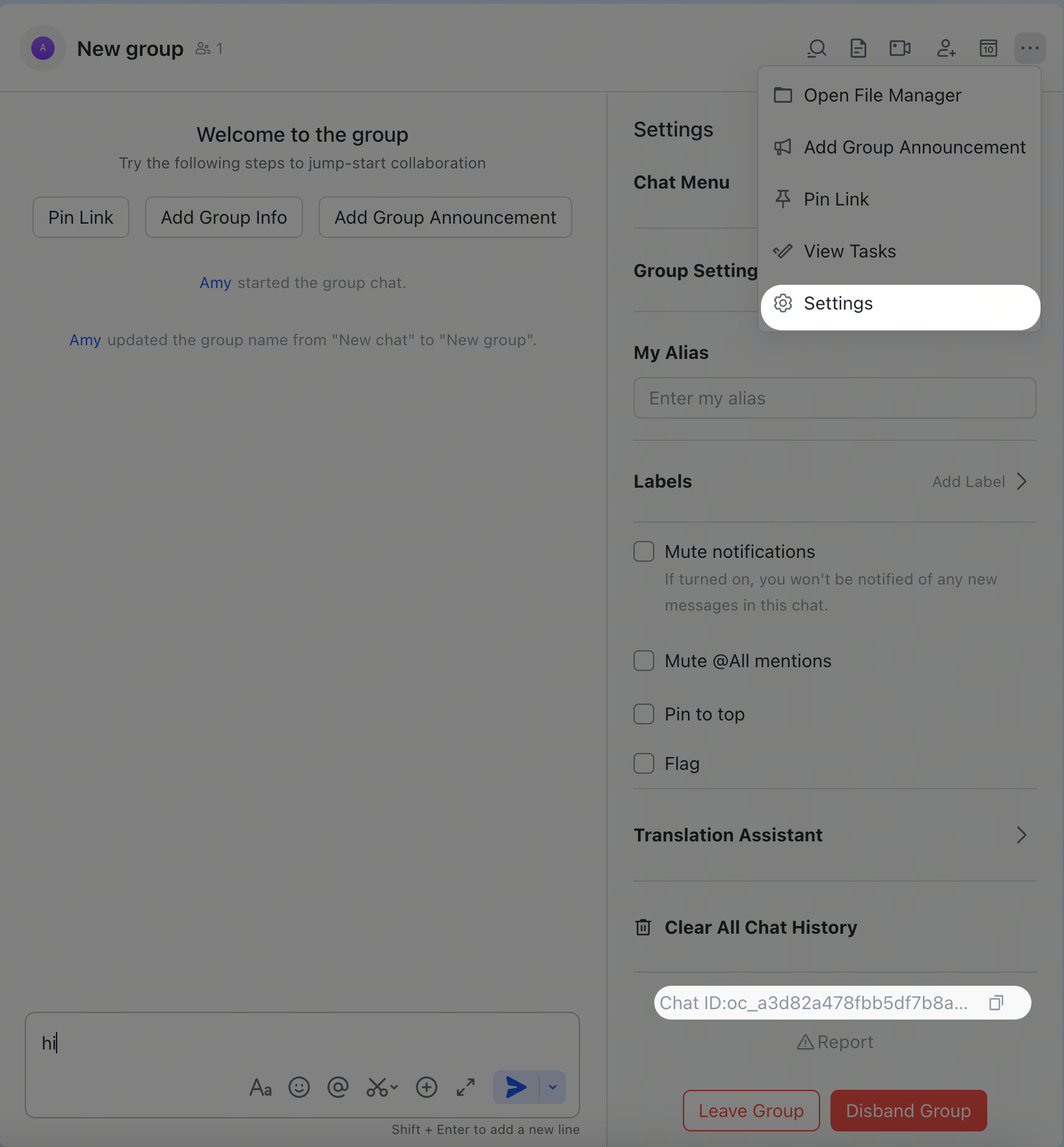
User IDs (open_id, format: ou_xxx)
Start the gateway, send a DM to the bot, then check the logs:
open_id in the log output. You can also check pending pairing requests:
Common commands
Feishu/Lark does not support native slash-command menus, so send these as plain text messages.
Troubleshooting
Bot does not respond in group chats
- Ensure the bot is added to the group
- Ensure you @mention the bot (required by default)
- Verify
groupPolicyis not"disabled" - Check logs:
openclaw logs --follow
Bot does not receive messages
- Ensure the bot is published and approved in Feishu Open Platform / Lark Developer
- Ensure event subscription includes
im.message.receive_v1 - For meeting invite auto-join, also subscribe to
vc.bot.meeting_invited_v1 - Ensure persistent connection (WebSocket) is selected
- Ensure all required permission scopes are granted
- Ensure the gateway is running:
openclaw gateway status - Check logs:
openclaw logs --follow
vc.bot.meeting_invited_v1 only delivers the event. Automatic joins are
default-off. To enable them globally:
vc:meeting.bot.join:write scope. For example, the official
lark-cli VC agent skill
provides vc +meeting-join.
QR setup does not react in the Feishu mobile app
- Rerun setup:
openclaw channels login --channel feishu - Choose manual setup
- In Feishu Open Platform, create a self-built app and copy its App ID and App Secret
- Paste those credentials into the setup wizard
App Secret leaked
- Reset the App Secret in Feishu Open Platform / Lark Developer
- Update the value in your config
- Restart the gateway:
openclaw gateway restart
Advanced configuration
Multiple accounts
defaultAccount controls which account is used when outbound APIs do not specify an accountId. Account entries inherit top-level settings; most top-level keys can be overridden per account.
accounts.<id>.tts uses the same shape as tts and deep-merges over global TTS config, so multi-bot Feishu setups can keep shared provider credentials globally while overriding only voice, model, persona, or auto mode per account.
Message limits
textChunkLimit- outbound text chunk size (default:4000chars)streaming.chunkMode-"length"(default) splits at the limit;"newline"prefers newline boundariesmediaMaxMb- media upload/download limit (default:30MB)
Streaming
Feishu/Lark supports streaming replies via interactive cards (Card Kit streaming API). When enabled, the bot updates the card in real time as it generates text.streaming.mode: "off" to send the complete reply in one message; renderMode: "raw" (plain text instead of cards) also disables streaming cards. streaming.block.enabled is off by default; enable it only when you want completed assistant blocks flushed before the final reply. Legacy boolean streaming and the flat blockStreaming / blockStreamingCoalesce / chunkMode keys migrate to this nested shape via openclaw doctor --fix.
Quota optimization
Reduce the number of Feishu/Lark API calls with two optional flags:typingIndicator(defaulttrue): setfalseto skip typing reaction callsresolveSenderNames(defaulttrue): setfalseto skip sender profile lookups
Group session scope and topic threads
channels.feishu.groupSessionScope (top-level, per account, or per group) controls how group messages map to agent sessions:
For the topic scopes, native Feishu/Lark topic groups use the event
thread_id (omt_*) as the canonical topic session key. If a native topic starter event omits thread_id, OpenClaw hydrates it from Feishu before routing the turn. Normal group replies that OpenClaw turns into threads keep using the reply root message ID (om_*) so the first turn and follow-up turns stay in the same session.
Set replyInThread: "enabled" (top-level or per group) to make bot replies create or continue a Feishu topic thread instead of replying inline. topicSessionMode is the deprecated predecessor of groupSessionScope; prefer groupSessionScope.
Feishu workspace tools
The plugin ships agent tools for Feishu documents, chats, knowledge base, cloud storage, permissions, and Bitable, plus matching skills (feishu-doc, feishu-drive, feishu-perm, feishu-wiki). Tool families are gated by channels.feishu.tools:
Per-account gates live under
accounts.<id>.tools.
feishu_doc creates title-only documents. To add Markdown, pass the returned
document_id as doc_token in a separate write action. A create request
that includes content fails without creating an empty document.
Grant drive:drive.metadata:readonly for direct feishu_drive info lookups outside the root
directory, unless the app already has the full drive:drive scope. Without either scope, info
keeps the legacy root-directory lookup available through drive:drive:readonly.
ACP sessions
Feishu/Lark supports ACP for DMs and group thread messages. Feishu/Lark ACP is text-command driven - there are no native slash-command menus, so use/acp ... messages directly in the conversation.
Persistent ACP binding
Spawn ACP from chat
In a Feishu/Lark DM or thread:--thread here works for DMs and Feishu/Lark thread messages. Follow-up messages in the bound conversation route directly to that ACP session.
Multi-agent routing
Usebindings to route Feishu/Lark DMs or groups to different agents.
match.channel:"feishu"match.peer.kind:"direct"(DM) or"group"(group chat)match.peer.id: user Open ID (ou_xxx) or group ID (oc_xxx)
Per-user agent isolation (Dynamic Agent Creation)
EnabledynamicAgentCreation to automatically create isolated agent instances for each DM user. Each user gets their own:
- Independent workspace directory
- Separate
USER.md/SOUL.md/MEMORY.md - Private conversation history
- Isolated skills and state
Dynamic bindings include the normalized Feishu
accountId, so default and named accounts route each sender to the correct dynamic agent.If a named account created an unscoped dynamic agent on an older release, that legacy agent still counts toward maxAgents. Confirm that it is not used by the default account before removing it, or temporarily increase maxAgents; OpenClaw cannot safely infer which account owns ambiguous legacy state.Quick setup
How it works
When a new user sends their first DM:- The channel generates a unique
agentId:feishu-{user_open_id}for the default account, or a bounded account-prefixed identity digest for a named account - Creates a new workspace at
workspaceTemplatepath - Registers the agent and creates a binding for this user
- The workspace helper ensures bootstrap files (
AGENTS.md,SOUL.md,USER.md, etc.) on first access - Routes all future messages from this user to their dedicated agent
Configuration options
Template variables:
{agentId}- the generated agent ID (e.g.,feishu-ou_xxxxxxorfeishu-support-<identity_digest>){userId}- the sender’s Feishu open_id (e.g.,ou_xxxxxx)
Session scope
session.dmScope controls how direct messages are mapped to agent sessions. This is a global setting that affects all channels.
Tradeoff: Using
"main" enables automatic bootstrap file loading (USER.md, SOUL.md, MEMORY.md), but means all DMs across all channels share the same session key pattern. For public multi-user bots where isolation matters more than bootstrap auto-loading, consider "per-channel-peer" and manage bootstrap files manually.
Use
"per-account-channel-peer" when named Feishu accounts should keep separate sessions for the same sender. Dynamic bindings preserve the account scope.Typical multi-user deployment
Verification
Check gateway logs to confirm dynamic creation is working:Notes
- Workspace isolation: Each user gets their own workspace directory and agent instance. Users cannot see each other’s conversation history or files within the normal messaging flow.
- Security boundary: This is a messaging-context isolation mechanism, not a hostile co-tenant security boundary. The agent process and host environment are shared.
- Config writes must stay enabled: Dynamic agent creation writes agents and bindings into the config; it is skipped when
channels.feishu.configWritesisfalse(default: enabled). bindingsshould be empty: Dynamic agents auto-register their own bindings- Upgrade path: Existing manual bindings continue to work alongside dynamic agents
session.dmScopeis global: This affects all channels, not just Feishu
Configuration reference
Full configuration: Gateway configuration
In webhook mode, both
channels.feishu.webhookPath and
channels.feishu.accounts.<id>.webhookPath must be canonical HTTP request paths
beginning with /, such as /feishu/events. An optional query string is
supported and must match exactly. Full URLs, relative paths, URL fragments, dot
segments, and unencoded spaces or Unicode are rejected. If an existing
configuration contains a noncanonical path, run openclaw doctor --fix to
repair it before starting the gateway.
Supported message types
Receive
- ✅ Text
- ✅ Rich text (post)
- ✅ Images
- ✅ Files
- ✅ Audio
- ✅ Video/media
- ✅ Stickers
file_key JSON. When tools.media.audio is configured, OpenClaw
downloads the voice-note resource and runs shared audio transcription before the
agent turn, so the agent receives the spoken transcript. If Feishu includes
transcript text directly in the audio payload, that text is used without another
ASR call. Without an audio transcription provider, the agent still receives a
<media:audio> placeholder plus the saved attachment, not the raw Feishu
resource payload.
Send
- ✅ Text
- ✅ Images
- ✅ Files
- ✅ Audio
- ✅ Video/media
- ✅ Interactive cards (including streaming updates)
- ⚠️ Rich text (post-style formatting; doesn’t support full Feishu/Lark authoring capabilities)
audio message type and require
Ogg/Opus upload media (file_type: "opus"). Existing .opus and .ogg media
is sent directly as native audio. MP3/WAV/M4A and other likely audio formats are
transcoded to 48kHz Ogg/Opus with ffmpeg only when the reply requests voice
delivery (audioAsVoice / message tool asVoice, including TTS voice-note
replies). Ordinary MP3 attachments stay regular files. If ffmpeg is missing or
conversion fails, OpenClaw falls back to a file attachment and logs the reason.
Threads and replies
- ✅ Inline replies
- ✅ Thread replies
- ✅ Media replies stay thread-aware when replying to a thread message
Related
- Channels Overview - all supported channels
- Pairing - DM authentication and pairing flow
- Groups - group chat behavior and mention gating
- Channel Routing - session routing for messages
- Security - access model and hardening